Versus comparison video — Arcade fighter style
Make a versus comparison like an arcade fighting game: two pixel robot boxers, health bars, FIGHT! and K.O.!, stat sheets and a high score table.
Incluso da Starter, con tutti i 81 stili più i tuoi · anteprima generata dal motore ClipOnIt
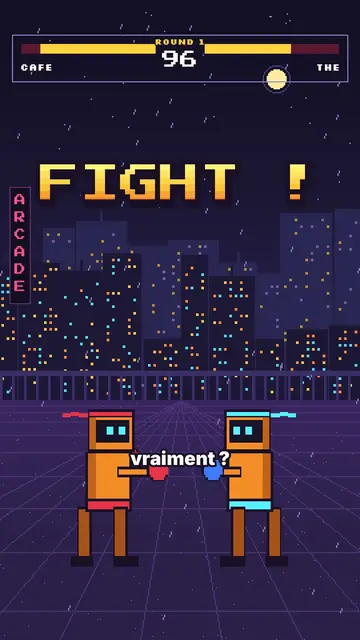
Che aspetto ha questo stile
Arcade fighter turns your topic into a retro brawl. In a purple night street, in front of a pixel city under the rain, two orange robot boxers face each other. At the top, the arcade HUD shows their names, their health bars, the round number and the timer. “FIGHT!” bursts out in big yellow-orange pixel type, and when an argument wins, the opponent drops with a white flash and a “K.O.!”.
Between rounds, the game brings out all its screens: a rolling pixel counter, a “CONTINUE?” with its countdown, a grid select screen where the cursor picks a fighter, stat sheets popping on a striped background, a high score table. Scenes open with an iris, text pops, and a crowd of robots can flood the foreground when you need to show “a hundred versions”.
Argomenti adatti
Avoid: serious, sad or sensitive topics: the brawl tone and the K.O.s would make them feel wrong. Also avoid topics with no opposition or ranking; the style needs two sides or a score.
- “X vs Y” comparisonsTwo names in the HUD, one round per criterion and a K.O. for the winner: the format is built in.
- RankingsThe select screen and the high score table rank the options like in a game.
- Tech and AITwo models, two phones, two apps: stat sheets compare the key numbers.
- Gaming videosViewers recognise the arcade codes and stay to see who goes down.
Idee video in questo stile
- Coffee vs tea
Both names in the HUD, a caffeine round, a sleep round and the final stat sheet.
- iPhone vs Android
Three rounds, a K.O. per criterion and the score table at the end.
- The best free editing tool
The grid select screen, the cursor picking and the winner's sheet.
- Why we give up on our resolutions
You vs laziness, the CONTINUE countdown and the number of days held.
Ottienilo con 1 clic
- Apri il link di questo stile
Il pulsante “Crea un video in questo stile” apre l'editor con questo stile già selezionato. Senza un account, la registrazione richiede un minuto e non serve una carta.
- Scrivi il tuo argomento in una frase
Un'idea basta. Puoi anche incollare il tuo testo oppure, da Starter, raccontare al microfono: il video si costruisce poi sulla tua voce.
- Rivedi, poi genera
L'IA scrive le scene, sceglie gli elementi dello stile e li sincronizza con le parole, con voce e sottotitoli. Tu correggi ciò che non va, poi l'MP4 verticale arriva in pochi minuti.
Cosa puoi regolare
For each scene you pick the shot (duel, solo, number, continue, select, sheet, scores or end), the big pixel announcement and its line below, the HUD names and round, which fighter falls and on which word, the crowd, the white flash and the word to comment.
Domande frequenti
Gratuito o a pagamento, output, usi: le risposte in breve.
Do accents work in the pixel font?
Big pixel announcements are written without accents, like on an arcade cabinet. Captions keep the full spelling.
Posso usare la mia voce?
Yes. Record yourself or import your audio: hits, K.O.s and screens land on your words.
How is it different from Pixel RPG quest?
Pixel RPG quest tells a tutorial as a quest, with a checklist and inventory. Arcade fighter pits two sides against each other, round after round, until the K.O.
Questo stile è nel piano gratuito?
No, è incluso in Starter ($29/mese): 15 video senza filigrana al mese, tutti i 81 stili più i tuoi. Il piano gratuito dà 3 video al mese con filigrana in 8 altri stili: Pixel News, Press paper, Comedy cartoon, Class sketch, Night tale, Social screen, Retro synthwave e Flat vector.
Se ti piace questo stile
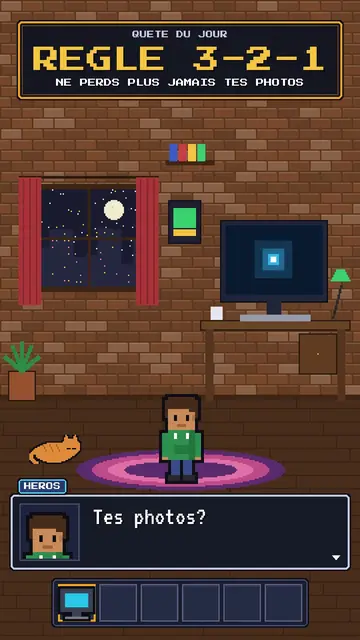
RPG-style tutorial video
Pixel RPG quest style · A tutorial played as a pixel art video game quest: checklist, dialogue box, inventory, spells.
- Gratis

Creatore di video synthwave
Stile retro synthwave · Pixel art viola-magenta, sole a strisce, griglia al neon.
- Gratis
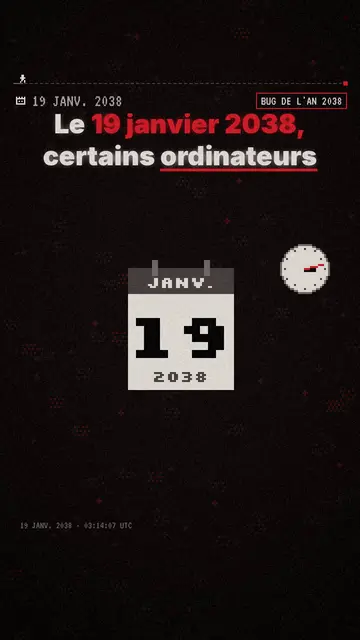
Creatore di video esplicativi in pixel art
Pixel News style · Grigio e rosso in pixel art, HUD datato, sottotitoli parola per parola.
Tutti gli stiliCome scegliere uno stile per i video esplicativi
La tua idea, in questo stile
Scrivi una frase o dilla a voce: lo stile è già selezionato quando arrivi all'editor.